
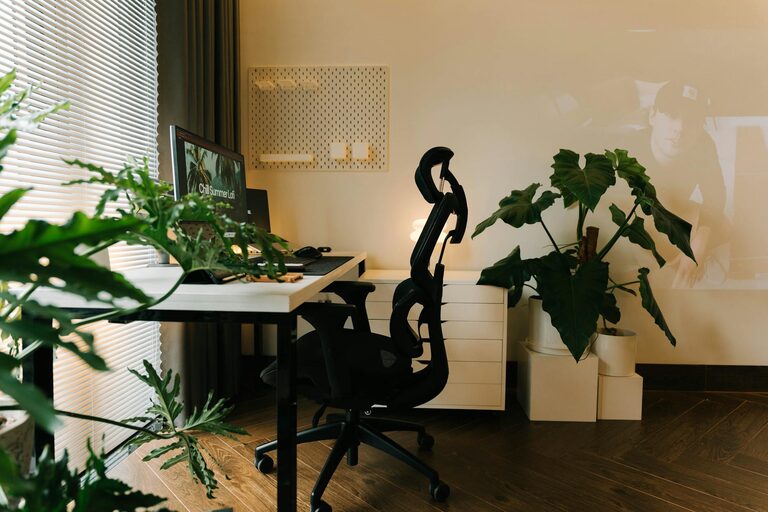
Creating a cosy and inviting home office space can transform the way you work, making your daily tasks more enjoyable and productive. Whether you have a dedicated room or just a small corner, the right environment can help you focus and feel comfortable throughout your workday. In this post, we will explore essential tips to help you design a workspace that’s both practical and welcoming.
Choose the Right Location
Selecting the ideal spot for your home office is the first step. Consider a quiet area of your home that is away from distractions such as the kitchen or living room. Natural light is also important; a space near a window can boost your mood and reduce eye strain. If natural light is limited, don’t worry—we’ll cover lighting solutions later.
Invest in Comfortable Furniture
Comfort is key when setting up a home office. Your chair and desk should support good posture to avoid discomfort during long hours of work.
– Ergonomic Chair: Choose a chair that offers good lumbar support and adjustable height.
– Appropriate Desk: Select a desk with enough surface area for your computer, documents, and any other essentials, while allowing enough legroom.
Remember, a comfortable setup can prevent back pain and increase your ability to focus.
Focus on Lighting
Proper lighting can reduce eye strain and create a welcoming atmosphere.
– Natural Light: Maximise daylight by positioning your desk near a window.
– Task Lighting: Use an adjustable desk lamp for focused work, especially in the evenings.
– Ambient Lighting: Incorporate soft, warm lighting like floor lamps or wall sconces to keep the space cosy.
Avoid harsh fluorescent lights that can feel clinical and tiring over time.
Personalise Your Workspace
Adding personal touches can make your home office feel more inviting.
– Plants: A few indoor plants can improve air quality and add a calming green element.
– Artwork or Photos: Hang inspiring art or family photographs to create a space that feels uniquely yours.
– Decorative Items: Choose items that bring you joy but don’t clutter your desk.
These details make the office more enjoyable and can stimulate creativity.
Keep It Organised
A tidy workspace reduces stress and helps maintain focus.
– Storage Solutions: Use shelves, drawers, and organisers to keep paperwork and office supplies in order.
– Cable Management: Use clips or ties to keep cords neat and out of sight.
– Regular Decluttering: Make time weekly to clear away unnecessary items.
An organised office promotes efficiency and a clear mind.
Incorporate Textiles for Warmth
Soft textiles create a cosy vibe and contribute to comfort.
– Rugs: A soft rug underfoot can make a space feel warmer and less sterile.
– Cushions: Add cushions to your chair for extra comfort.
– Curtains or Blinds: Choose window coverings with a soft texture, allowing you to control light levels and privacy.
These textures add layers to the room, making it more inviting.
Pay Attention to Colours
Colour affects mood and productivity.
– Calming Colours: Blues, greens, and neutrals encourage focus and relaxation.
– Accent Colours: Use brighter colours like yellow or orange sparingly to add energy.
– Consistency: Keep colour choices consistent with your home’s overall décor for harmony.
Pick colours that inspire you, but avoid overly bright or distracting shades.
Minimise Noise and Distractions
A peaceful environment helps you concentrate better.
– Soundproofing: If possible, use rugs, curtains, or wall panels to absorb noise.
– Headphones: Consider noise-cancelling headphones if you can’t control the noise.
– Smart Layout: Position your desk away from noisy appliances or high-traffic areas.
Minimising distractions creates a productive workspace.
Add a Touch of Nature
Beyond plants, incorporating natural elements can enhance the environment.
– Natural Materials: Choose a wooden desk or accessories made from natural fibres.
– Fresh Air: Open windows regularly to allow fresh air circulation.
– Nature Sounds: If you prefer, soft background sounds like rainfall or birdsong can be soothing.
Bringing nature indoors supports wellbeing and creativity.
Keep Technology User-Friendly
Your technology setup should be easy to use and efficient.
– Ergonomic Accessories: Use wireless keyboards and mice that reduce strain.
– Screen Positioning: Place your monitor at eye level to avoid neck pain.
– Reliable Internet: Ensure your connection is strong to prevent interruptions.
Smooth technology means fewer frustrations during your workday.
Conclusion
Designing a cosy and inviting home office space doesn’t have to be complicated. By focusing on comfort, lighting, organisation, and personal touches, you can create a workspace that feels welcoming and supports your productivity. Remember to tailor your office to your needs and preferences—it’s your personal work retreat within your home. With these tips, you’ll be well on your way to enjoying your time spent working from home.